This page is about the part of your integration that runs in your app, using a wallet-holder token. You get one by minting a delegated token for the user.
If your backend instructs every movement on its own credential instead, your users hold no session and the operations marked User token are not part of your build.
Wallet User Guide — Screens → API
This guide walks through the consumer wallet web app screen by screen, and maps each screen (and the actions on it) to the exact Wallet API endpoints that power it. Hand it to a client so they know which API to call, with what payload, for each thing the user sees.
The screenshots below are from a live demo tenant — GoMart (X-Tenant-Code: GOMART),
a white-label deployment at https://gomart-app.wallet.dev.gohubpay.com.my. Branding
(name, logo, colors) is per-tenant; the API surface is identical for every tenant.
Every request carries two things: a Bearer JWT (Authorization: Bearer <accessToken>)
and the tenant selector X-Tenant-Code. The web app resolves the tenant from its host
(<subdomain>-app.wallet…) and obtains the JWT from POST /auth/login.
Every mutating call also sends an Idempotency-Key (UUID) header. See
Getting Started for the base URL + auth details.
1. Login
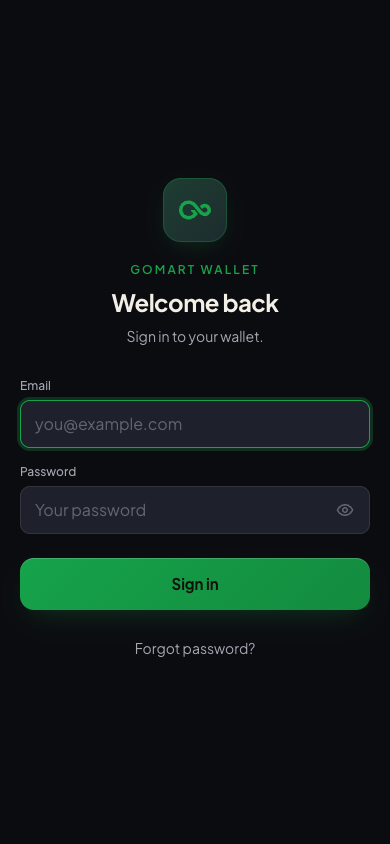
The entry screen. The user signs in with email + password; the app exchanges them for an access token. First-time users arrive by an emailed invite link and set their password before they can sign in at all.
APIs — Authentication
POST /auth/login—{ "email", "password" }+ headerX-Tenant-Code. ReturnsaccessTokenandexpiresIn, and sets the refresh cookie. A login either succeeds or fails; there is no challenge state to handle.POST /auth/invite/complete— sets the first password:{ "token", "newPassword" }. The token comes from the invite email and is single-use. →204, then sign in normally.GET /auth/password-policy— drives the live password-rule hints.POST /auth/forgot-password— "Forgot password?" link; emails a reset link.
2. Home
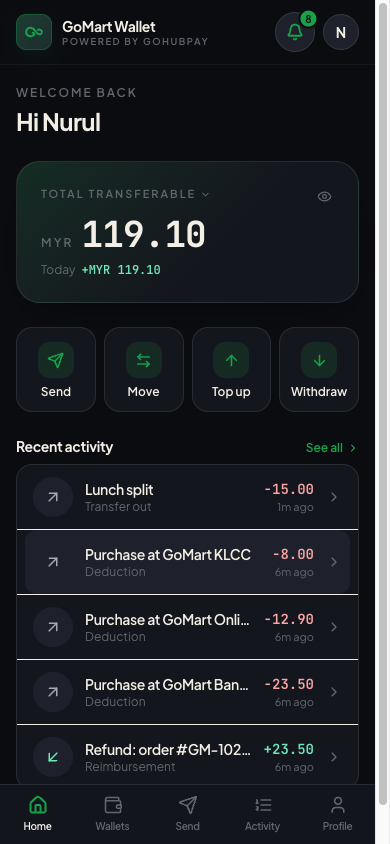
The landing screen after login: greeting, total transferable balance, quick actions (Send / Move / Top up / Withdraw), the unread-notification badge, and a recent-activity feed.
APIs — Wallets, Transactions, Notifications
GET /wallets/summary— the headline total across the user's wallets.GET /wallets— wallet cards / balances.GET /transactions?size=5— the "Recent activity" list.GET /me/notifications/unread-count— the bell badge (here:8).
The four quick-action buttons are deep links to the Send, Top-up and Withdraw screens below.
3. Wallets
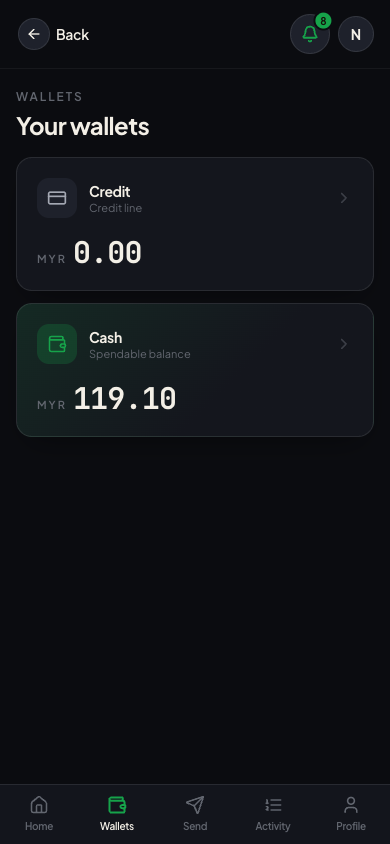
Lists every wallet the user holds — typically a CASH (spendable earnings) wallet and a CREDIT (obligation) wallet. Which types exist is configured per tenant.
APIs — Wallets, Wallet Capabilities
GET /wallets— the list, each withwalletType,status, balance.GET /me/wallet-types— which wallet types + actions (peer-transfer, move, top-up) are enabled for this user, so the UI shows only allowed actions.
4. Wallet detail — CASH
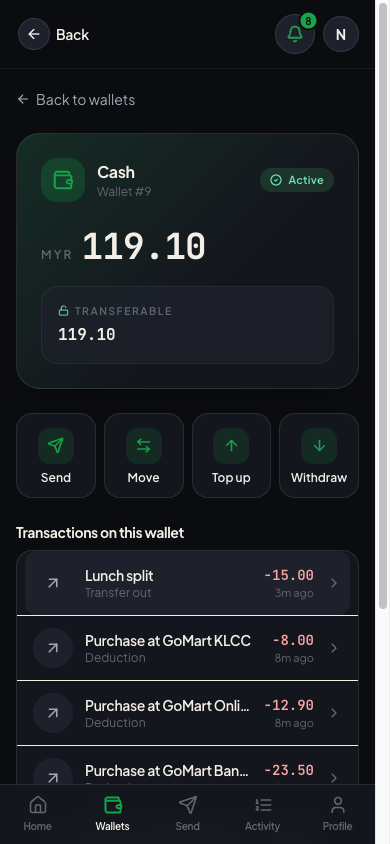
A single wallet's balance, its fund buckets (TRANSFERABLE / NON_TRANSFERABLE), and its transaction history scoped to that wallet.
APIs — Wallets, Transactions
GET /wallets/{walletId}— header + status.GET /wallets/{walletId}/balance— the live balance.GET /wallets/{walletId}/funds— the per-bucket breakdown.GET /transactions?walletId={walletId}— this wallet's activity.
5. Wallet detail — CREDIT (empty state)
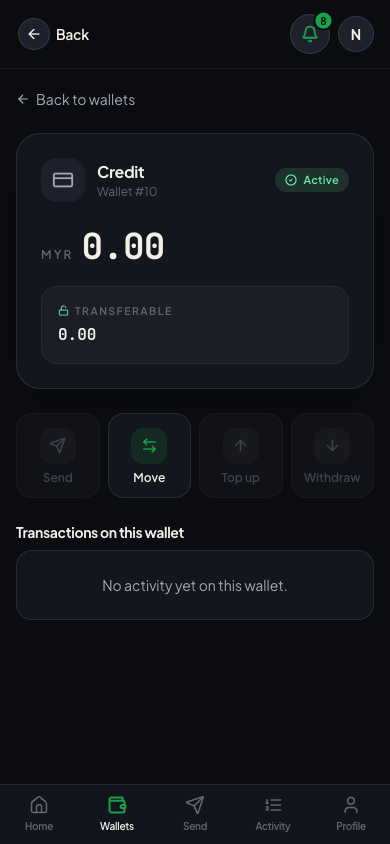
The same detail screen for a wallet with no movements yet — the empty state. Same endpoints as above; the history list simply returns no rows.
APIs — identical to §4. GET /transactions?walletId={id} returns an empty page.
6. Activity
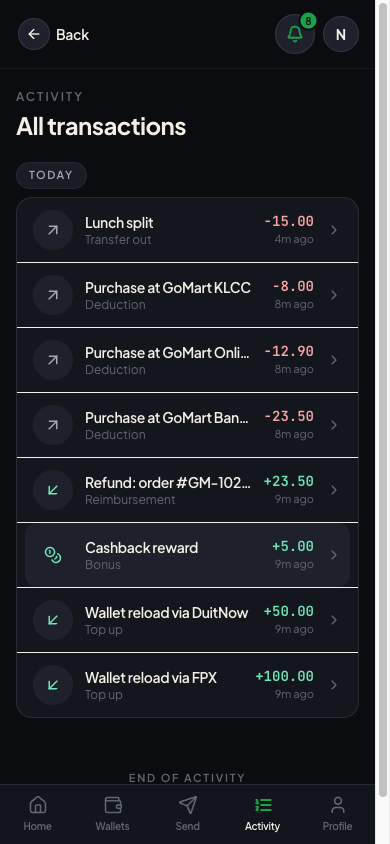
The full, paginated transaction history across the user's wallets — top-ups, purchases (deductions), refunds, cashback, transfers.
APIs — Transactions
GET /transactions?page={n}&size={n}— paged history. Each row carriestransactionType,amount,description,status,createdAt. Tapping a row opens its detail (§7).
7. Transaction detail
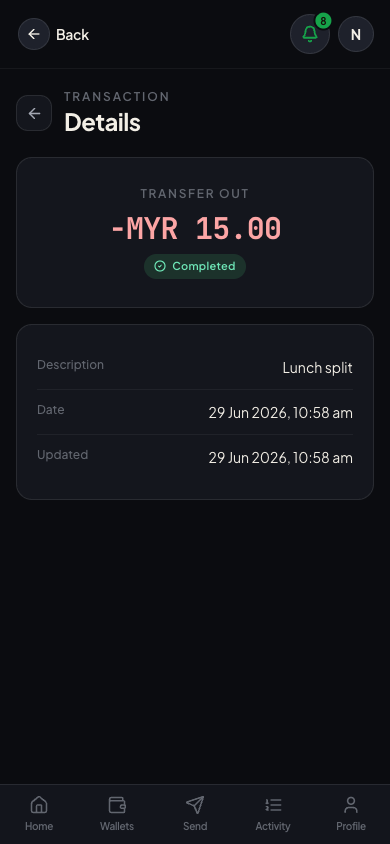
One transaction in full — amount, type, status, counterparty, timestamps, and — for gateway-backed movements (top-up / withdrawal) — the payment-gateway block (provider, gateway txn id, our reference, status) used to reconcile against the gateway.
APIs — Transactions
GET /transactions/{transactionId}/detail— the full record including thegatewayblock (provider,gatewayTransactionId,reference,status,method,beneficiaryName,failureReason). For a non-gateway transaction thegatewayblock is null.
8. Send money — recipient lookup
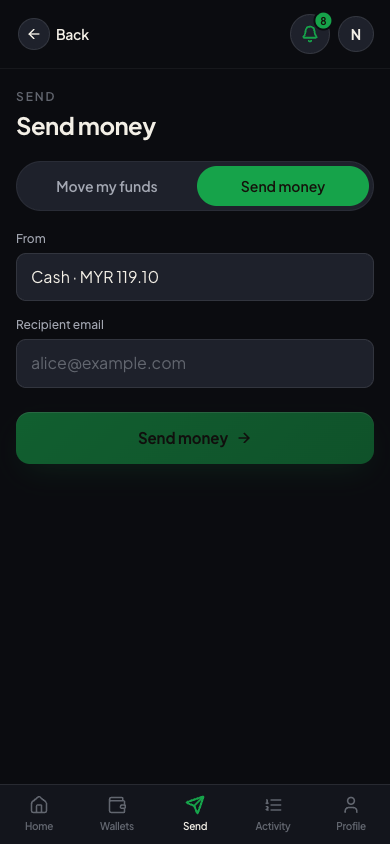
Pick the source wallet and enter the recipient's email. The app pre-validates the recipient on blur — before any money moves.
APIs — Transfers
GET /transfers/lookup-recipient?email=...— always200; the body'sfound+canReceiveflags carry the answer (anti-enumeration design — no recipient details leak for unknown emails).
9. Send money — recipient resolved
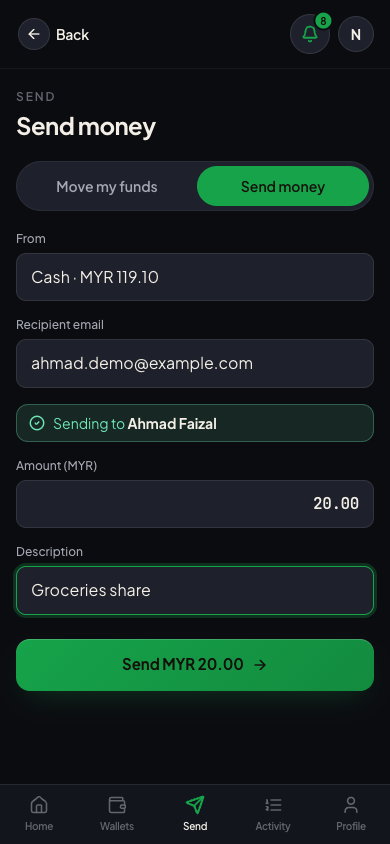
Once the recipient resolves ("Sending to Ahmad Faizal"), the amount + description fields appear and the user can confirm. The backend resolves the recipient's ACTIVE CASH wallet — the caller never names a wallet id (prevents tampering).
APIs — Transfers
POST /transfers/peer—{ "sourceWalletId", "recipientEmail", "amount", "description" }+Idempotency-Key. Atomic two-leg transfer (FUND_TRANSFER_OUT+FUND_TRANSFER_IN).
10. Move my funds
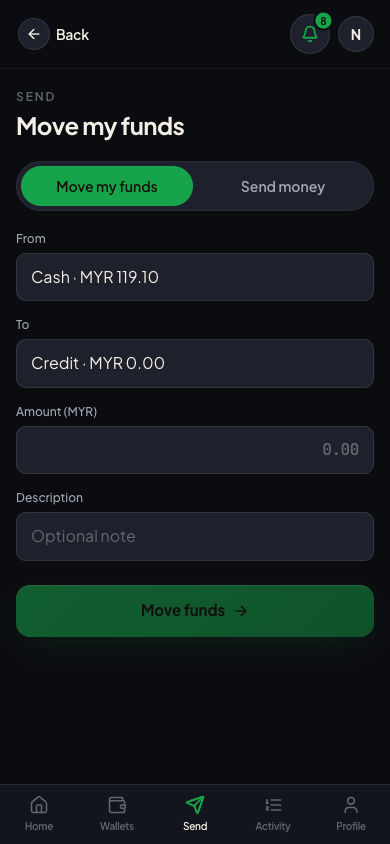
The "Move" tab of the same screen — an atomic transfer between the user's own two wallets
(defaults to CASH → CREDIT), rather than to another person. Requires at least two ACTIVE
wallets whose types allow moving (canMove).
APIs — Transfers
POST /transfers—{ "sourceWalletId", "targetWalletId", "amount", "description" }+Idempotency-Key. Both wallets must belong to the caller. OptionalsourceFundType/targetFundTypechoose the fund buckets (default TRANSFERABLE). Posts a linkedFUND_TRANSFER_OUT+FUND_TRANSFER_INpair.
11. Top up
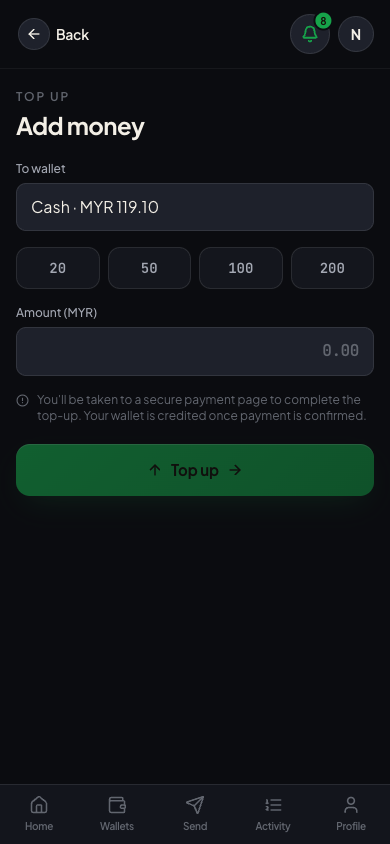
Add money to a wallet via the payment gateway. The user enters an amount; the app creates a payment intent and redirects to the gateway-hosted checkout. On return, the app polls until the webhook settles the credit.
APIs — Top-ups, Webhooks (request/response schemas + examples are on each operation page in the reference)
The flow:
POST /me/top-ups— create the payment intent forwalletId+amount. Returns aredirectUrlto the gateway-hosted checkout; send the browser there.GET /me/top-ups/{id}— poll on the return screen until terminal (SUCCEEDED/FAILED). History:GET /me/top-ups. (GET /wallets/{walletId}/top-upsis the tenant-backend view of the same data and is not callable with a user token.)POST /payments/webhook/{provider}/{tenantCode}— gateway → wallet settlement callback; the authoritative credit. Your app never calls this and it is not in the published specs — it is listed so the sequence makes sense. SignedX-Webhook-Signature: sha256=<hex>= HMAC-SHA256 over the raw body, keyed by the profile's dedicated webhook secret; the wallet verifies (constant-time) and credits exactly once.GET /payments/return/{provider}/{tenantCode}?intent={id}— a302back to the app's/topup/returnpage. Carries no money decision and is not signature-verified — status comes from the webhook + poll.
Operators can also generate a hosted link without a logged-in user via POST /wallets/{walletId}/top-up-link.
The amount entered is a hint; the gateway-captured amount (confirmed by the webhook) is what gets credited.
12. Withdraw
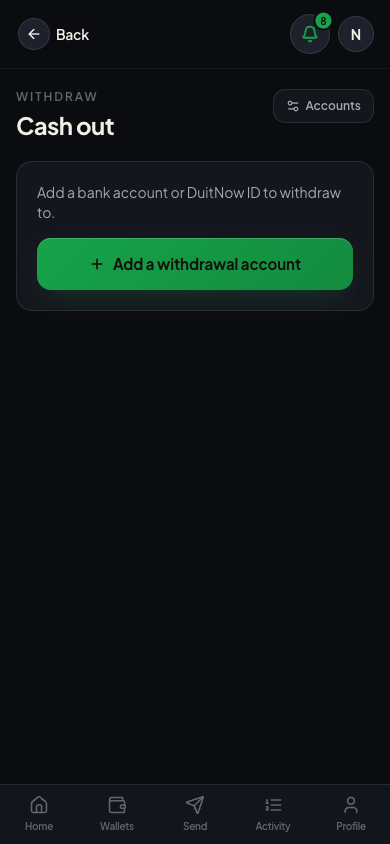
Cash out from a wallet to a saved bank / DuitNow destination. The user picks an amount and a saved account; the backend places a hold, then submits the payout. Status reaches a terminal value via the payout webhook (primary) with a reconciler poll as backstop.
APIs — Withdrawals, Withdrawal Accounts (request/response schemas + examples are on each operation page)
The flow:
POST /me/withdrawals(+Idempotency-Key) — pickwithdrawalAccountId+amount. Places the hold and submits the payout; returns the withdrawal inPENDING.GET /me/withdrawals/{id}(andGET /me/withdrawalsfor the list) — track the lifecycleCREATED → PENDING → SUCCEEDED | FAILED | MANUAL_REVIEW. OnSUCCEEDEDthe hold is captured; onFAILEDit's released via a compensating credit.POST /payouts/webhook/{provider}/{tenantCode}— gateway → wallet settlement callback (primary settle path). SignedX-Webhook-Signature: sha256=<hex>= HMAC-SHA256 over the raw body, keyed by the same dedicated webhook secret as payment webhooks (SCRUM-306). The wallet mapstransaction_id→payoutReference, verifies, and settles once.
13. Withdrawal accounts
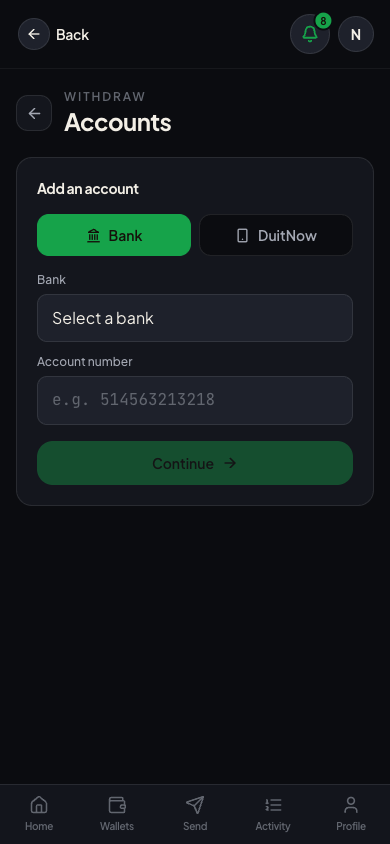
Manage saved payout destinations. Adding one runs a confirmation-of-payee enquiry against the
gateway and stores the verified account-holder name. Requires a verified KYC profile (else 403).
APIs — Withdrawal Accounts, Banks (request/response schemas + examples are on each operation page)
GET /banks— the bank / e-wallet picker (codes, display names, payout capability).POST /me/withdrawal-accounts/enquiry— pre-check a destination (returnsverified+beneficiaryName) without saving.POST /me/withdrawal-accounts(+Idempotency-Key) — save it. BANK route =bankCode+accountNumber; DuitNow route =proxyType+proxyValue(+countryCode). Runs the enquiry and persistsVERIFIED/UNVERIFIED; the account number is returned masked.GET /me/withdrawal-accounts/DELETE /me/withdrawal-accounts/{id}— list / remove.
14. Profile
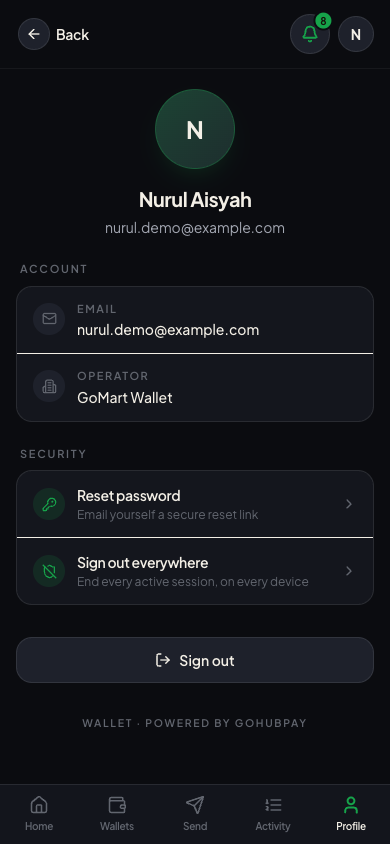
The user's identity (name, email, operator), plus security actions — reset password and sign-out-everywhere.
APIs — Identity, Authentication
GET /users/{id}— the profile shown here. (GET /portal/iam/meexists but is an internal operator endpoint, not part of the published app surface — do not build against it.)POST /auth/forgot-password— "Reset password" emails a secure reset link.POST /auth/global-signout— "Sign out everywhere" ends every active session on every device.POST /auth/logout— the plain "Sign out" button.
15. Notifications
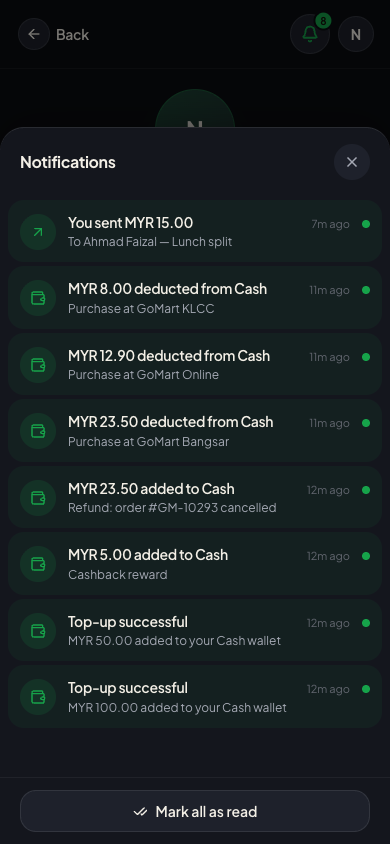
The in-app inbox, opened from the bell. Each financial event (top-up, deduction, refund, transfer) generates a notification automatically.
APIs — Notifications
GET /me/notifications— the inbox list.GET /me/notifications/unread-count— the bell badge.PATCH /me/notifications/{id}/read— mark one read (tapping it).POST /me/notifications/mark-all-read— the "Mark all as read" footer action.
16. Responsive — desktop
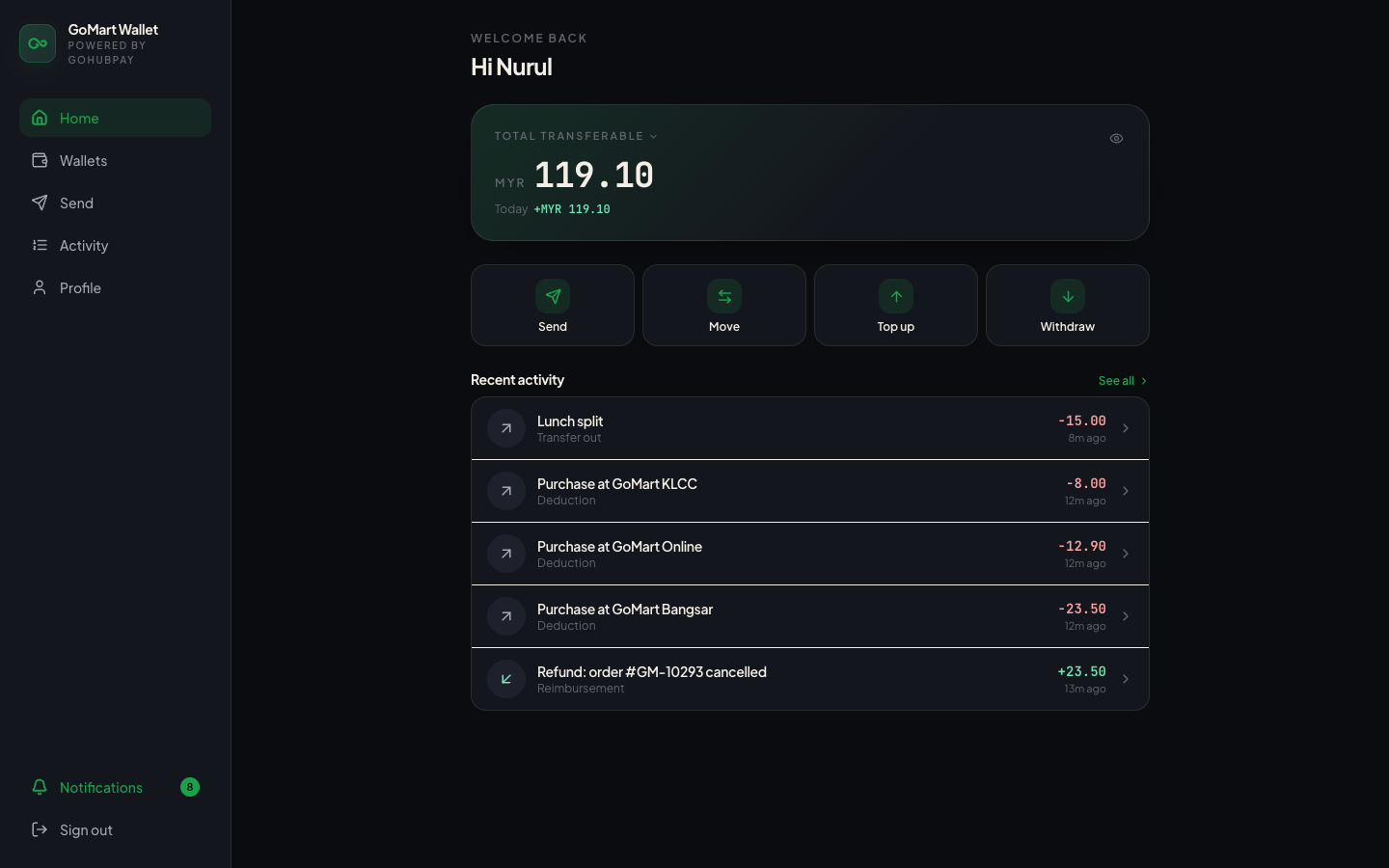
The same single web app adapts to width: bottom-tab navigation on mobile, a persistent left sidebar on desktop (≥768px). It is one React tree — no separate desktop build, same APIs.
Endpoint cheat-sheet
| Screen | Primary endpoint(s) |
|---|---|
| Login | POST /auth/login, POST /auth/invite/complete |
| Home | GET /wallets/summary, GET /transactions, GET /me/notifications/unread-count |
| Wallets | GET /wallets, GET /me/wallet-types |
| Wallet detail | GET /wallets/{id}, GET /wallets/{id}/balance, GET /wallets/{id}/funds |
| Activity | GET /transactions |
| Transaction detail | GET /transactions/{id}/detail |
| Send money | GET /transfers/lookup-recipient, POST /transfers/peer |
| Move funds | POST /transfers |
| Top up | POST /me/top-ups, GET /me/top-ups/{id} |
| Withdraw | POST /me/withdrawals, GET /me/withdrawals/{id} |
| Withdrawal accounts | GET /banks, POST /me/withdrawal-accounts, POST /me/withdrawal-accounts/enquiry |
| Profile | GET /users/{id}, POST /auth/global-signout |
| Notifications | GET /me/notifications, PATCH /me/notifications/{id}/read, POST /me/notifications/mark-all-read |
For full request/response schemas of every endpoint, see the Wallet API Reference.